> ## Documentation Index
> Fetch the complete documentation index at: https://docs.sandywp.com/llms.txt
> Use this file to discover all available pages before exploring further.
# API keys
> Create, use, and revoke personal API keys for the SandyWP CLI and full HTTP API.
A personal API key is a full-access credential for the CLI, direct HTTP API, and the SandyWP Cloner plugin. Use scoped OAuth rather than a personal key when connecting an MCP client.
 ## Create a key
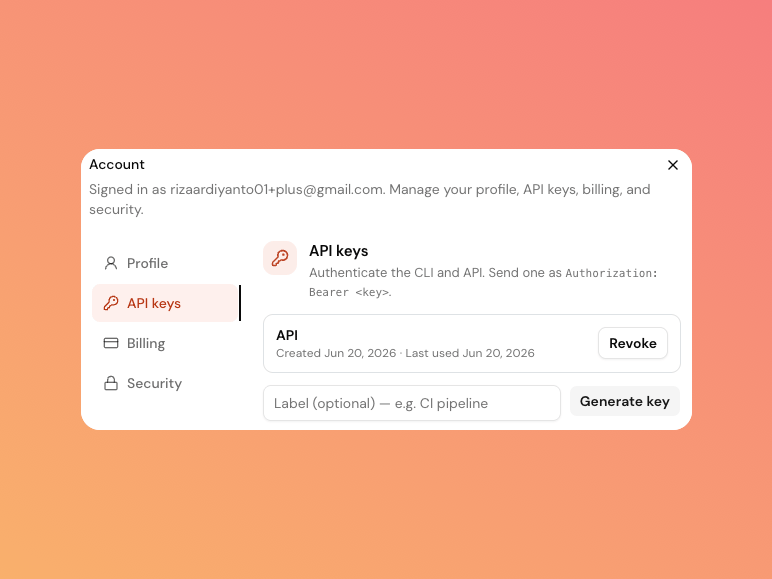
Open the profile menu, select **Account**, and then choose the **API keys** tab.
Add an optional label such as `ci-pipeline`, then select **Generate key**.
Copy the key immediately. SandyWP shows the plaintext key once and cannot show it again later.
Use it as a bearer token.
```http theme={null}
Authorization: Bearer swp_your_personal_key
```
Do not commit a key, paste it into public chat, or reuse one key across unrelated tools. A personal API key has full account access.
## Revoke a key
Select **Revoke** next to a key in the API keys tab. It stops working immediately.
The list shows the label, creation time, and last-used time. Create separate keys per environment so one key can be revoked without interrupting another workflow.
## MCP connections are different
An MCP client uses a browser-approved, scoped OAuth connection. Its token may call `GET /api/account/me` and the Imports family with the documented `import:read` or `import:write` scopes, but other generated REST operations do not accept it. See [OAuth connector flow](/api-reference/oauth).
Use the [CLI](/cli) for common automation, or start with the [API Reference overview](/api-reference) when you need direct HTTP requests.
## Create a key
Open the profile menu, select **Account**, and then choose the **API keys** tab.
Add an optional label such as `ci-pipeline`, then select **Generate key**.
Copy the key immediately. SandyWP shows the plaintext key once and cannot show it again later.
Use it as a bearer token.
```http theme={null}
Authorization: Bearer swp_your_personal_key
```
Do not commit a key, paste it into public chat, or reuse one key across unrelated tools. A personal API key has full account access.
## Revoke a key
Select **Revoke** next to a key in the API keys tab. It stops working immediately.
The list shows the label, creation time, and last-used time. Create separate keys per environment so one key can be revoked without interrupting another workflow.
## MCP connections are different
An MCP client uses a browser-approved, scoped OAuth connection. Its token may call `GET /api/account/me` and the Imports family with the documented `import:read` or `import:write` scopes, but other generated REST operations do not accept it. See [OAuth connector flow](/api-reference/oauth).
Use the [CLI](/cli) for common automation, or start with the [API Reference overview](/api-reference) when you need direct HTTP requests.