> ## Documentation Index
> Fetch the complete documentation index at: https://docs.sandywp.com/llms.txt
> Use this file to discover all available pages before exploring further.
# Lifespan and permanence
> Choose when a SandyWP sandbox expires, make it permanent, and understand retention after expiry.
Sandboxes are disposable by design. Choose a lifespan when creating one, then make an account-owned sandbox permanent when it needs to remain available.
## Default lifespans
| Creator | Default | Available choices |
| ------- | ------- | ------------------------------- |
| Guest | 7 hours | Fixed at 7 hours |
| Account | 1 week | 1 hour to 1 month, or permanent |
Use the **Site lifespan** field in **Advanced settings** when you create the sandbox. See [Create a sandbox](/guides/create-a-sandbox) for the full form.
## Make a sandbox permanent
On the dashboard, click the open lock on the sandbox row. You can also open the detail page and select **Make permanent**.
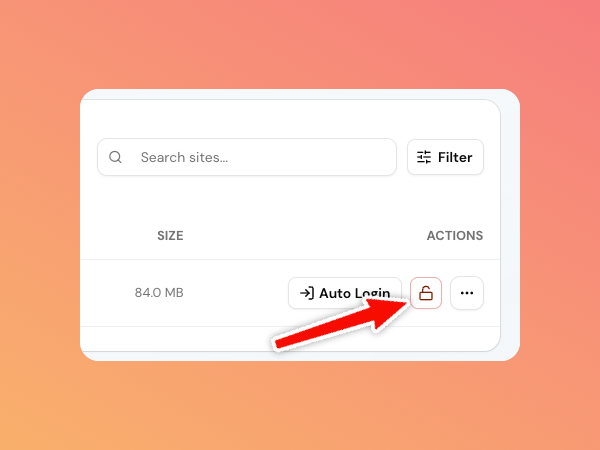 A permanent sandbox shows an expiry of **Never**. You can change this while the sandbox is `creating` or `ready`.
Permanent sandboxes require a paid plan. Click the lock again, or select **Make temporary**, when you want the normal expiry behavior back.
## After a sandbox expires
An expired sandbox moves to the **Expired** tab and is no longer running. You cannot use its tools or sign in while it is retained.
| Plan | Retention before deletion |
| ------------ | ------------------------- |
| Guest | 6 hours |
| Free account | 12 hours |
| Paid account | 7 days |
After retention ends, SandyWP permanently removes the container, database, files, and route. Save a [Template](/guides/templates) before expiry when you need a reusable copy.
## Find a sandbox by state
The dashboard's **Active** view shows creating, ready, and failed sandboxes. **Expired** shows items in their retention window, while **All** includes both groups.
See [Plans and limits](/guides/plans) for permanent-sandbox eligibility.
A permanent sandbox shows an expiry of **Never**. You can change this while the sandbox is `creating` or `ready`.
Permanent sandboxes require a paid plan. Click the lock again, or select **Make temporary**, when you want the normal expiry behavior back.
## After a sandbox expires
An expired sandbox moves to the **Expired** tab and is no longer running. You cannot use its tools or sign in while it is retained.
| Plan | Retention before deletion |
| ------------ | ------------------------- |
| Guest | 6 hours |
| Free account | 12 hours |
| Paid account | 7 days |
After retention ends, SandyWP permanently removes the container, database, files, and route. Save a [Template](/guides/templates) before expiry when you need a reusable copy.
## Find a sandbox by state
The dashboard's **Active** view shows creating, ready, and failed sandboxes. **Expired** shows items in their retention window, while **All** includes both groups.
See [Plans and limits](/guides/plans) for permanent-sandbox eligibility.