> ## Documentation Index
> Fetch the complete documentation index at: https://docs.sandywp.com/llms.txt
> Use this file to discover all available pages before exploring further.
# Welcome to SandyWP
> Create disposable WordPress sandboxes for plugin testing, debugging, demos, and experiments.
SandyWP creates real, isolated WordPress sandboxes that are ready for work and safe to throw away. Use one to test a plugin, reproduce a bug, try a theme, or share a temporary demo.
 ## Create your first sandbox
You can create a free sandbox from the SandyWP homepage without an account. An account unlocks the dashboard, multiple sandboxes, templates, Git deployment, cloning, and more.
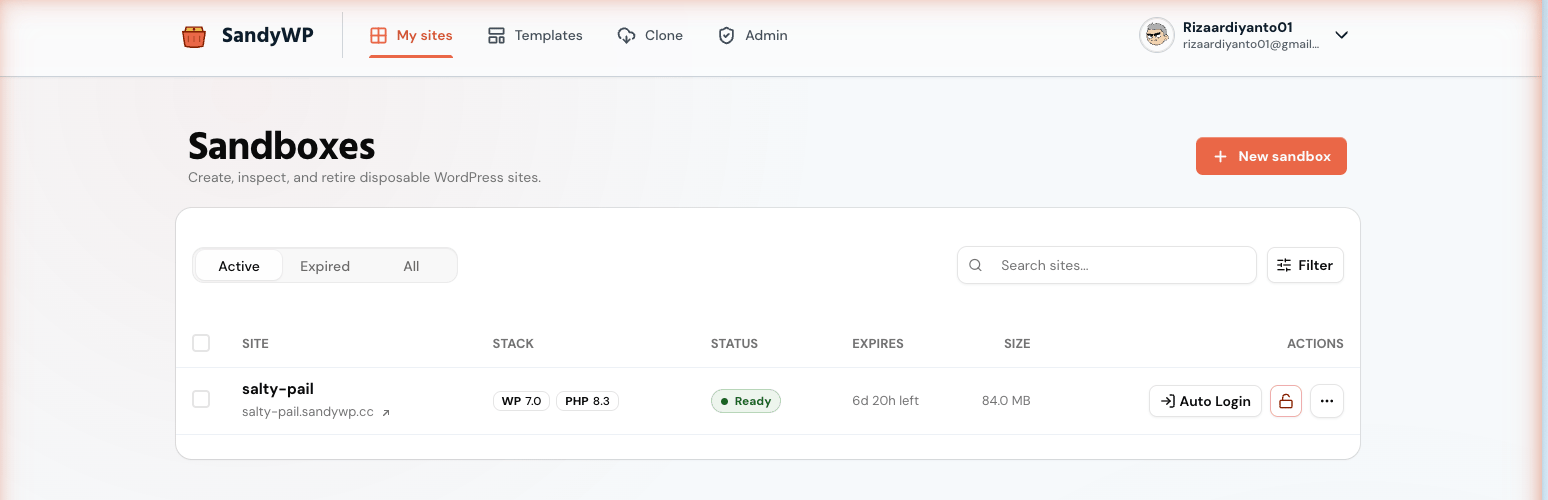
From the [SandyWP dashboard](https://app.sandywp.com/app), select **New sandbox**. Or choose **Create a free sandbox** on the [SandyWP homepage](https://sandywp.com).
A name is optional. You can also choose a WordPress version, PHP version, region, lifespan, and a saved template.
SandyWP shows provisioning progress. When the status becomes `ready`, open the public site or select **Auto Login** to enter `wp-admin`.
Guest sandboxes have a fixed seven-hour lifetime. Free accounts can run two active sandboxes and choose a lifespan of up to one week.
## Choose a workflow
Configure a fresh WordPress site, a saved template, or a debugging setup.
Sign in with a one-click link or copy the site credentials.
Create, deploy, push, mount, and manage sandboxes from a terminal.
Use a personal API key and the generated endpoint reference for supported resources.
## What you can do
| Need | Start here |
| --------------------------------- | -------------------------------------------------------------- |
| Edit files in the browser | [File Manager](/guides/file-manager) |
| Change PHP or inspect a database | [PHP settings](/guides/php) or [Database](/guides/database) |
| Deploy a plugin or theme from Git | [Git deployment](/guides/git-deployment) |
| Start from a reusable snapshot | [Templates](/guides/templates) |
| Reproduce a setup as JSON | [Blueprints](/guides/blueprints) |
| Put a local site online | [Push a local site](/guides/push-local-site) |
| Work from Slack or GitHub | [Slack](/guides/slack) or [GitHub PR previews](/guides/github) |
## Next steps
* Read [Core concepts](/concepts) to understand sandboxes, slugs, lifecycle, plans, and regions.
* Read [Plans and limits](/guides/plans) before relying on a sandbox for longer work.
* Create a personal API key only when you need automation; it has full account access.
## Create your first sandbox
You can create a free sandbox from the SandyWP homepage without an account. An account unlocks the dashboard, multiple sandboxes, templates, Git deployment, cloning, and more.
From the [SandyWP dashboard](https://app.sandywp.com/app), select **New sandbox**. Or choose **Create a free sandbox** on the [SandyWP homepage](https://sandywp.com).
A name is optional. You can also choose a WordPress version, PHP version, region, lifespan, and a saved template.
SandyWP shows provisioning progress. When the status becomes `ready`, open the public site or select **Auto Login** to enter `wp-admin`.
Guest sandboxes have a fixed seven-hour lifetime. Free accounts can run two active sandboxes and choose a lifespan of up to one week.
## Choose a workflow
Configure a fresh WordPress site, a saved template, or a debugging setup.
Sign in with a one-click link or copy the site credentials.
Create, deploy, push, mount, and manage sandboxes from a terminal.
Use a personal API key and the generated endpoint reference for supported resources.
## What you can do
| Need | Start here |
| --------------------------------- | -------------------------------------------------------------- |
| Edit files in the browser | [File Manager](/guides/file-manager) |
| Change PHP or inspect a database | [PHP settings](/guides/php) or [Database](/guides/database) |
| Deploy a plugin or theme from Git | [Git deployment](/guides/git-deployment) |
| Start from a reusable snapshot | [Templates](/guides/templates) |
| Reproduce a setup as JSON | [Blueprints](/guides/blueprints) |
| Put a local site online | [Push a local site](/guides/push-local-site) |
| Work from Slack or GitHub | [Slack](/guides/slack) or [GitHub PR previews](/guides/github) |
## Next steps
* Read [Core concepts](/concepts) to understand sandboxes, slugs, lifecycle, plans, and regions.
* Read [Plans and limits](/guides/plans) before relying on a sandbox for longer work.
* Create a personal API key only when you need automation; it has full account access.